
One shared timeline
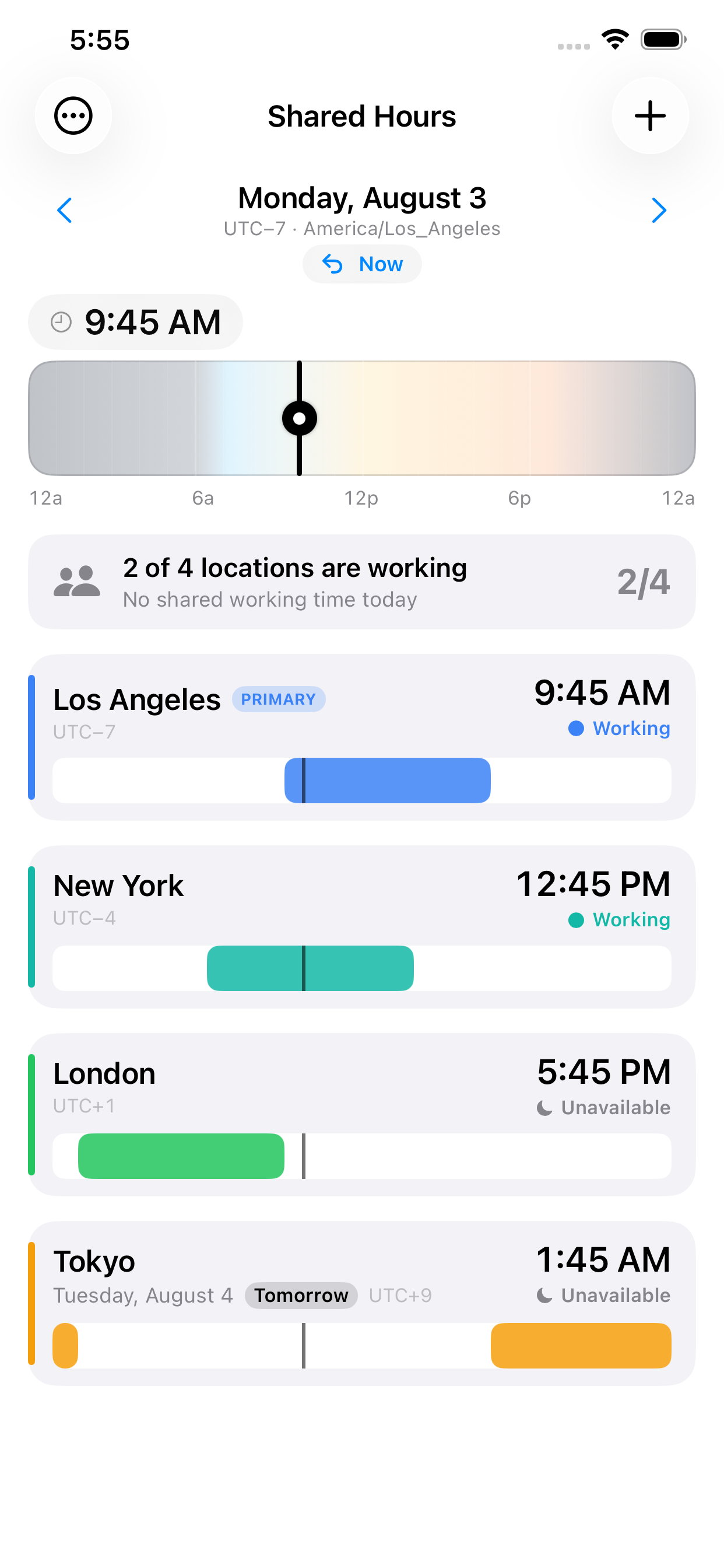
Drag the playhead across a 24-hour timeline in 15-minute steps. Every city's local time updates instantly, with a gentle tap of haptic feedback as you cross each hour.
Designed for iPhone
SharedHours lines up the working hours of every city you care about on one shared timeline. Drag the playhead and watch the local time, date, and availability update everywhere at once — so you can spot the window when everyone is actually free.
Why you'll like it
No mental math, no spreadsheet of offsets. Add your cities once and SharedHours does the comparing for you — accurately, and entirely on your device.
Drag the playhead across a 24-hour timeline in 15-minute steps. Every city's local time updates instantly, with a gentle tap of haptic feedback as you cross each hour.
Each city shows a working-hours band and a clear Working or Unavailable status. When everyone lines up, the shared window is highlighted — “Everyone is available” or “2 of 4 are working.”
SharedHours stores real time-zone rules, not fixed offsets, so every date shows the correct UTC offset — even across the days when regions spring forward or fall back.
Yours to set up
Search for a city and add it in a tap. Set each one's working hours and days, give it a color, pick your primary location, and reorder the list to match how you think. Move to any date to plan ahead, then jump back to now with a single tap.
Private by design
SharedHours needs no account and no connection. There are no ads, no analytics, and no trackers — your cities and settings stay on your iPhone. It follows the platform, too: light and dark mode, Dynamic Type, and full VoiceOver support, including adjusting the time without a drag gesture.